

I'm often very impressed with the home made video's posted on this forum. I would love to see the poster give a breif description of-
1/ Type of camera used and media storage type
2/ How much zoom, and was a tripod required?
3/ The type of editing program used.
4/ What type of computer, Mac or MS Windows based.
The reason that I'm interested in these features, is that I have not had much luck with my HD flash storage video camera, and am considering going back to my MinDv tape video cam.
Thanks!
I have made over 100 small video's mostly of dirt bikes and 4wd action,
Thanks Marcus, my flash storage camera is this one here.
www.chinavasion.com/china/wholesale/Digital_Cameras-Camcorders/
My mini DV camera is a JVC GR-D370AA with a 32 times optical zoom. Editing the footage via Firewire is alot smoother than the HD stuff. I use both Ulead video studio and windows movie maker, and the computer is a HP P4 3.0 gig laptop with 1 gig of RAM. The onboard graphics are 524 megs. I know that it's not the best gear, but when I'm happy with one of my movies, I'll try posting it.
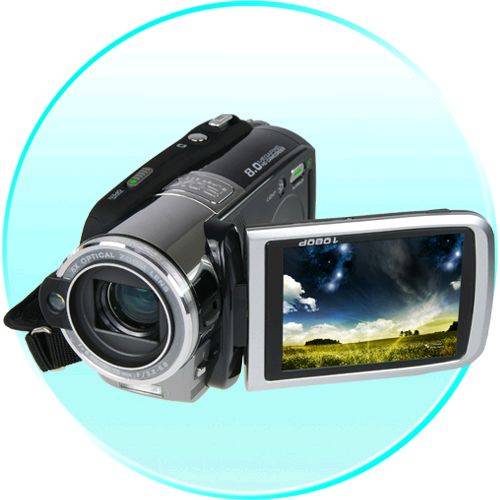
looks like a great camera, but its a big ask for a laptop to handle HD video editing. Ulead video studio is a farely stable editing program, thats the one I use if I don't want any hassels. Looking foward to seeing your next vid, cheers Marcus
always use a tripod. It looks like crap if you dont use one, even with the camera on wide angle.
I use and old Panasonic camera with the mini DV tapes, and edit on i-movie.
Yeah..Mac is king when it comes to editing
Always used my Panasonic NV-GS500 Mini DV tape 12 x zoom with 1.5x tele conversion lense with good results. Recently tried a Sanyo HD flash storage camera and had heaps of trouble. Could not edit on any of my computers without crashing, even with what I thought was a reasonably high end spec. I normally use Premiere Elements, but HD would just not work properly. Have now switched back to the more reliable Mini DV until my computer technology catches up with video technology.
AB
Thanks for the replies! It almost confirms to me that HD video is not worth the hassle, unless you just want to play via component straight to a big screen plasma or LCD. On my JVC tape camera, the highest quality video setting appears to be equivalent to DVD (standard definition quality).
I use Cyberlink power director 8 and have had no problems with it at all.. i don't know jack about my computer except its about a 7 year old Dell.. But the cyberlink programme will upgrade SD to HD.. and considering i am using a crappy little Olympus tough designed for stills i have been pretty happy with the movies it puts out.. especially if you watch them in HD.. I know you have probably seen it before but here it is again 
Here he is, dusted. I missed you and your no brain comments, lol. You realy are a
Aah yes my least favorite topic - HD too hard to edit. And for many people they cant even get it into the computer..
Its not too bad if you consider that for true HD editing you need to have the investment in Hardware and software for post production.
The mac is probably the best way to get up to speed for a newby as it is so plug and play -
to give microsoft their due they have caught up alot in the easy stakes.
For those who know what they are doing A windows based machine and a quality editor (vegas / premiere etc) will do it too
- but there are so many traps with HD- especially if you arent using a camera / codec from the big 3 (Canon, Sony, Panasonic)
Here is my story:
I was looking into purchasing a Sony Ex series camera a few years back -its got some amazing features , low light and sharpness- but the mpeg 2 codec would mean that i also would need a whole new editing set up. Or super slo entire transcode of all footage - not viable when you are shooting 300 to 400 clips a day.
I went for the Panasonic HVX200 - it records HD in dvcprohd (a brillant fantastic codec)- which edits with the same processor demand as good old DV - so i got 2 more years of productivity out of my edit suite !! (final cut on a g5 power pc MAc Pro tower from 06 ) - And my render times on the timeline (grades / compositing / speed changes) are fast.